Your first page
A white label is a page: one domain, one composition, one UUID. Taking a new one from nothing to something a player can open is seven acts, each on a different screen. None of them is optional, and one of them — the DNS record — the platform does not perform for you.
- 1Sign inAt your own back-office address.
- 2Pick the pageThe card at the top of the sidebar. Until you pick, half the menu is absent.
- 3Check its configurationCurrencies, countries, languages. With no active currency the client takes no bets.
- 4Point a domain at itThe platform registers no DNS record for a page. Nothing answers until you do.
- 5Compose itCustomize, on the page's row. There is no Composer entry in the sidebar.
- 6PublishOne button, one act. Players see it the moment it lands.
- 7Open the live siteThe page's name in the editor's bar, and the dot beside it.
1. Sign in
The back-office answers on one address per client. Platform staff sign in on the platform's; a client's own staff sign in on the client's — the subdomain its name produced, which the platform printed under that name while the client was being created.
Sign in with Email and Password. Some deployments add a captcha to that form. If your account has two-factor enrolled, a second step asks for the code from your authenticator app, or a recovery code; there is no session until you answer it.
A deployment with no accounts at all shows First run instead of the sign-in form: it creates the platform's first administrator, and from then on the same screen is the sign-in. See Back-office basics for roles, permissions and how a session ends.
2. Pick the page you are working on
The card at the top of the sidebar is Active page. For platform staff, until you pick one it reads Platform and carries the tag Supervision. Open it and you get a tree headed Operators and pages: your own home first — the Platform row, marked All pages — then each client as a heading over its pages. An operator's own staff see Choose a page under the tag Operator until they pick.
Every client below your own is a heading over its pages: you pick one of its pages, never the client itself. The one row that is not a heading is your own home — the platform for platform staff, their own operator for a client's staff — and standing there with no page named is supervision.
Picking one re-points every scoped screen at once, and five sidebar entries that were not there appear: Players, Bets, Limits, Risk and Boosted odds. They are gone rather than greyed out, which is why a brand-new account cannot find the bets ledger.
The choice is a preference stored on your account, not a second login. It follows you to another browser and another machine, it re-mints no session, and it grants nothing: which pages you may reach is asked of the database on every request.
If there is no page to pick yet
Operators → Create operator registers the client in three steps — Operator, Administrator, Wallet. It creates the client, its first administrator and the back-office address that administrator signs in on. It does not create a page, whatever the wizard's own sub-line says: you land on an empty pages listing.
New page on that listing is what makes one. Its Identity step asks for the name, the domain, a logo and the sportsbook kind — External — integrated into a casino or Internal — stands on its own. The rest of the wizard says where the page's data lives and which wallet its bets run against.
The pages listing, column by column
Every later step starts from this screen: Operators → the operator → See its pages.
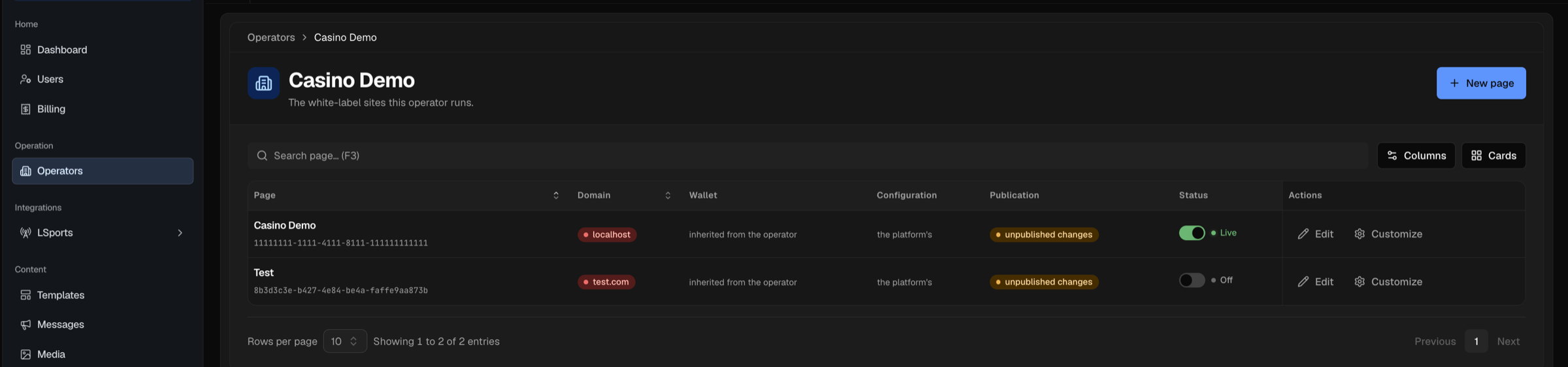
| Column | What it reports |
|---|---|
| Page | The name over the page's UUID, each with a copy button. That UUID is the X-Tenant-Id an embed sends. |
| Domain | The domain as a chip that opens the live site, tinted by the platform's own probe — see step 7. |
| Wallet | own or inherited from the operator, with a red (blocked) when the stored base is one the platform cannot compose the three paths from. A blocked page takes no bets. |
| Configuration | A link — it reads the platform's — onto the configuration screen of step 3. |
| Publication | not composed, unpublished changes, or published with the live version's number, and the date under it. |
| Status | Live or Off. Switching a page off stops it answering immediately: no odds load and no bet is accepted. A page under a client that is switched off reads Off because its operator is. |
3. Check the page's configuration
Follow the Configuration link on the page's row. The screen is Page configuration and it holds three tables: Currencies, Countries and Languages.
Read the empty states first — each one is a rule, not a placeholder.
| Table | With nothing active |
|---|---|
| Currencies | Without an active currency this client takes no bets. A correctly composed, correctly published page refuses every ticket, and the bet slip tells the player Bets cannot be taken in any currency yet. |
| Countries | Every country is accepted. With any country active, a reader the platform places outside them meets the country lock instead of the sportsbook. |
| Languages | The page offers the ones listed here, and a player who has picked none starts in the one marked Default. |
This configuration belongs to the client, not to the page. Every page that client runs takes the same currencies, countries and languages, so switching a currency on here switches it on for each of its white labels. The full screen is Page configuration.
4. Point a domain at the page
The domain on the page's Identity is doing three jobs at once: it is where the hosted site answers, it is how a request finds the page, and it is the whole of what the platform accepts as an origin.
Type it with or without https://; it is stored bare, lower-cased, without a
port. It is unique across the platform — no two pages hold the same domain.
| Host | Reaches this page |
|---|---|
casino.example.com — the domain as stored | Yes. |
www.casino.example.com — the sibling derived from it | Yes. The pair is derived, never configured. |
| Any other host | No. |
There are no wildcards, and there is no list of extra hosts to add. A page IS the entry. A second brand is a second page; a portal that embeds the widget and a staging environment are each registered as a page of their own, or they are refused.
An embedded sportsbook is held to the same rule. The widget names the page
with the tenant-id attribute when the casino sets one, and with the casino
page's own origin when it does not — but the origin is checked either way,
before the UUID is read. The host the widget sits on is registered as a page,
or the browser is refused. See
The web component.
The DNS record is not the platform's to make. Creating a client auto-provisions the client's own back-office subdomain, and nothing else: a page's domain needs its own DNS record pointing at the deployment and its own row on the reverse proxy. Until both exist, the domain answers nothing and the dot in step 7 stays red — the page and its composition are fine, and nobody can reach them.
5. Compose it
Customize, on the page's row, opens the editor over that page. There is no Composer entry in the sidebar, the mobile bar or the command palette; this is the way in. Opening the editor from the listing does not change which page you are working on.
The editor always opens on the canvas: a page with nothing composed opens the blank canvas. The starting-point gallery is the editor's Templates mode, on the rail, and it is reachable at any time — including on a page that is fully composed and published. It offers one factory card, Default template, plus every template this operator saved.
Picking one replaces the draft — whatever you were composing is gone. What is published is not touched: the live page keeps serving it until you press Publish again, and the frozen versions stay in the Versions panel — see Templates.
From there the page is composed block by block on the canvas: The editor.
6. Publish
- The domain serves the template's own content, finished as it ships.
- The listing reads not composed, or unpublished changes.
- Your draft is on the server and reaches nobody outside the back-office.
- Everything you have done is still one button away.
- Players see your composition, at that numbered version.
- The listing reads published, with the live version's number and the date.
- The draft goes on saving itself and still reaches nobody.
- Every later Publish moves the live page again, at once.
The one write button in the editor's bar reads Publish. Pressing it folds the canvas, fills in the languages the page is missing, freezes a numbered version and moves the live page to it — one act. It says so: Published. Players now see this version.
There is no separate save. Ctrl+S is this button and it publishes. Everything before it is the draft, which writes itself 900 ms after you stop changing anything and is seen by nobody. To keep a restore point without putting anything in front of players, freeze one in the Versions panel — Versions and publishing.
7. Open the live site and read the dot
The page's logo and name, at the left of the editor's bar, are a link to that page's own site, opened in a new tab. The dot beside them is the platform's verdict on its domain.
The probe runs on the server, not in your browser: one GET to the domain's root, redirects followed, five seconds to answer, and only a final 200 counts. It re-asks every minute.
| Dot | What it says |
|---|---|
| Green | The domain answered 200. |
| Red | Nothing answered 200 there — the record does not resolve yet, the proxy answers on another host, or the certificate is not issued. |
| Grey | No answer has been recorded for that domain yet. Give the sweep a minute. |
The same verdict tints the Domain chip on the pages listing, so a red dot is visible without opening the editor.
When every save in the editor fails
One failure is worth knowing before you meet it, because no screen explains it and nothing you do to the page will clear it.
What you see. Every write is refused. The status reads Save failed and
the card under it reads It could not be saved, carrying the server's own
line: Unknown template: and an id. Retrying fails the same way. Nothing is
wrong with what you composed.
What it is. A page can carry the id of the render template it falls back to; one that carries none takes the platform's default and never meets this failure. If that id names a template this deployment no longer ships — renamed, withdrawn, or a page carried over from another deployment — the back-office refuses to write the page's content at all, rather than store content nothing can render.
What players see. Nothing changes. A published page keeps drawing its own composition, and a page with none falls back to the platform's default template. This is a back-office failure, not an outage.
Who fixes it. Not you, and not from any screen: no back-office screen offers the template pick. Repointing the page is a platform operation, so report it with the page's name and the id printed on that card. Your unwritten work is kept in that browser and offered back the next time you open the page there — that is the only copy of it, so do not carry on from another machine. See The editor.
Next: Page configuration — the currencies, countries and languages a client's pages run on.